How to Sell Tickets on Your Own Website
If your group already has a website, it can sell your tickets too. Whether it's built with Wix, Squarespace, WordPress or anything else, there are a few ways to do it.
Three ways to sell tickets on your website
A link or button to a booking page. The event has its own booking page, hosted by whoever sells your tickets, and your site links to it. It's the simplest option and works on any website.
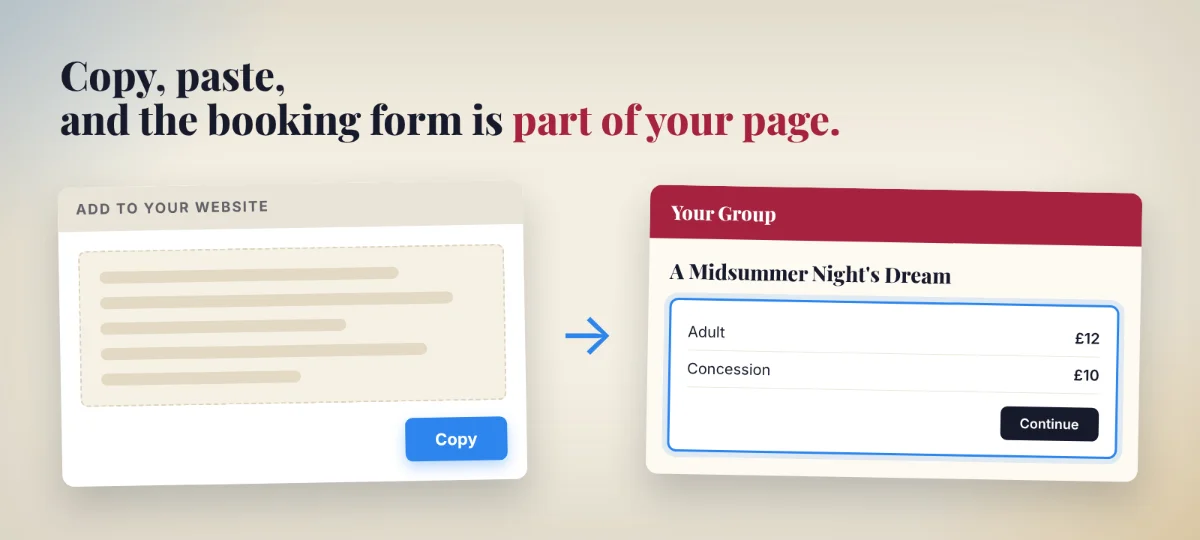
A booking form embedded in your page. You paste a piece of code into a page on your site, and the booking form appears inside it, under your own heading and next to your own words and pictures. It's a neat way to sell event tickets on your website, with the booking form right alongside everything else about the event.
Building payments into the site yourself. You, or a developer, connect your site directly to a card payment company and build the whole booking system around it. That means writing and testing everything a ticketing platform already does, then keeping it secure, working and up to date for as long as you sell tickets. It's a lot of work and a lot of responsibility for something you can have ready-made.
Why the payments are best left to someone else
Taking a card payment is the easy part. The work is everything around it. Card details have to be handled under strict security rules. Every ticket sold has to come off what's left the moment it's bought, so the last seat only goes once. Every buyer needs a confirmation and a ticket to show on the night. And when someone needs to swap to a different date, that has to be simple too.
A ticketing platform has all of that built already. Link to its booking page or embed its booking form, and you get the lot with nothing to build.
What embedding looks like
You copy a short block of code for your event and paste it into a page on your website. When you publish the page, the booking form appears in that spot, inside your own design, and grows or shrinks to fit as the buyer picks tickets and pays.
A page of its own, called something like "Tickets", works well. Its address is easy to put on posters and in social posts, and everyone who visits it lands right where they can book.
Selling event tickets on Wix, Squarespace, WordPress and other builders
Whether you sell tickets on Wix, through Squarespace or on a WordPress site, it works the same way. The code goes into the builder's own block for it, usually called "Embed" or "Custom HTML", and the booking form sits right there on the page.
What the buyer sees
The buyer stays on your page from start to finish. They choose their tickets, confirm their email address and pay by card, all inside the form. Once they've paid, they get an email with a link to their tickets.
No website?
You don't need a website to sell tickets online. A hosted booking page does the whole job on its own. Share its link on social media and in emails, and put it on posters as a QR code. If you build a website later, the same booking form can go straight into it.
Selling tickets on your own website with Time For A Show
Every event on Time For A Show gets its own booking page as soon as it's published, so a link works straight away. The code for your own site sits under "Add to your website" on every event, ready to copy.
Time For A Show also lets you make a separate QR code for each poster, flyer or social post, so you can see which ones actually sell tickets. Once the booking form is on your own site, those codes can take people straight to your page, and you still see where every sale came from.
Card payments, sending tickets and keeping count of what's left are all handled for you, whichever way people book. See how selling tickets with Time For A Show works.